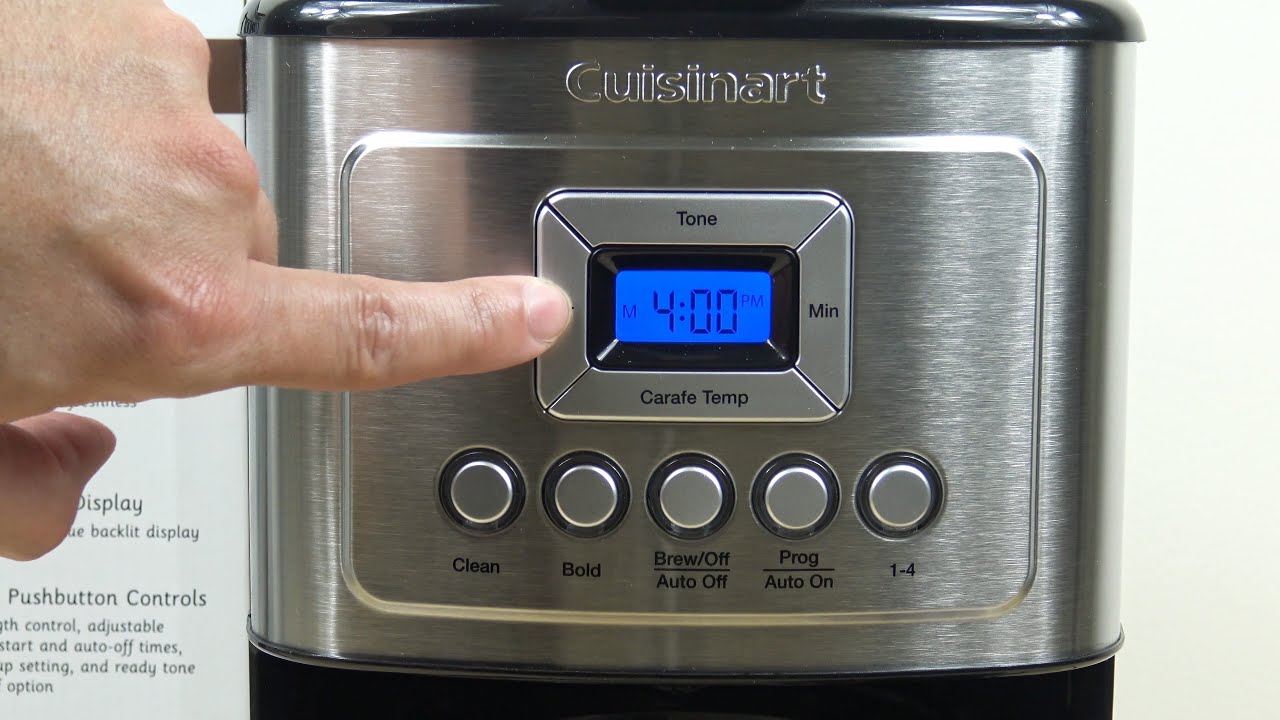
Press and hold the Hour or Minute button, adjust the display to the correct time, and confirm the setting according to your Cuisinart model.
A Cuisinart coffee maker can make your morning routine much easier. Whether you live in a busy New York apartment, a quiet Texas home, or a small kitchen in California, a programmable coffee maker can help you get your first cup ready on time. However, the clock must show the correct time before you can use its automatic brewing feature.
Most programmable Cuisinart coffee makers use Hour and Minute buttons to set the clock. Some models also have a Function knob with a CLOCK position. You turn the knob to CLOCK, adjust the hours and minutes, and let the display stop flashing. Other models use a simple button-based process, so the exact steps depend on your machine.
The good news is that setting the clock is usually a quick task. You do not need special tools or technical skills. In this guide, you will learn how to set the time, check AM and PM, program automatic brewing, and solve common clock problems. You will also learn why setting the clock and setting the automatic brew time are two different tasks.
Why Does Your Cuisinart Coffee Maker Need the Correct Time?
Your Cuisinart coffee maker needs the correct clock setting to run its scheduled brewing feature at the right time. The clock tells the machine what time it is. The Auto On or Program feature tells it when to start making coffee.
For example, imagine you want fresh coffee at 6:30 a.m. before leaving for work. If the clock shows 5:30 a.m. when the actual time is 6:30 a.m., the scheduled brew may not start when you expect.
A correct clock also helps you check programmed settings. You can see whether the machine is displaying the current time or a separate scheduled brewing time. This is useful when you change your morning routine or move the coffee maker to another room.
Source: firewoodcafe.com
Accurate automatic brewing
The correct clock helps the machine follow your selected brew schedule.
Better daily planning
You can set a brewing time that fits your morning routine.
Easier timer checks
A correct clock makes it easier to compare the current time with the Auto On setting.
Clock Time vs. Auto On Time
These two settings have different jobs. Clock time shows the current time of day, while Auto On time tells the coffee maker when to begin brewing.
For example, you may set the clock to 8:00 p.m. and the Auto On time to 6:00 a.m. The first setting tells the machine the current time. The second tells it when to start the next brewing cycle.
Clock setting
Shows the actual current time.
Auto On setting
Sets the future time when automatic brewing should begin.
Auto Off setting
On supported models, controls how long the machine stays on after brewing.
How to Set Time on Cuisinart Coffee Maker Step by Step
The easiest way to set the clock on most programmable Cuisinart coffee makers is to use the Hour and Minute buttons. Before you begin, check whether your machine has a Function knob, a CLOCK button, or a simple digital control panel.
The following steps describe the common process for Cuisinart models with a Function knob and separate Hour and Minute buttons. If your model uses a different panel, check its instruction booklet before changing the controls.
Source: coffeeatoz.com
What you need
Your Cuisinart coffee maker, access to a working electrical outlet, the correct local time, and the instruction booklet or model number.
Step 1: Plug In Your Coffee Maker
Start by placing your Cuisinart coffee maker on a stable, dry kitchen counter. Make sure the power cord is in good condition and plug the machine into a suitable outlet.
Look at the digital display. On many programmable models, the display shows 12:00 when the machine is first plugged in. This is the default clock display and means that the time still needs to be set.
Check the display
Look for 12:00 or another default time.
Check the power
Make sure the display is working and the machine has a steady power supply.
Step 2: Turn the Function Knob to CLOCK
If your coffee maker has a Function knob, turn it to the CLOCK position. This tells the machine that you want to change the current time rather than select a brewing function.
Some Cuisinart models begin clock-setting mode when you press and hold the Hour or Minute button. These models may not need a separate CLOCK position. Follow the control layout on your machine.
CLOCK position
Use this position when your model has a Function knob.
Button-only models
Press and hold the Hour or Minute button if the instruction booklet gives this method.
Step 3: Set the Correct Hour
Find the Hour button on the control panel. Press and hold it until the clock begins to flash or the hour digits start changing. Keep holding the button to move through the numbers quickly.
When the correct hour appears, release the button. If you move past the number you need, press the button again as directed by your model to reach the correct setting.
Take your time with this step. The hour must be correct before you finish adjusting the minutes.
Hold to scroll
Holding the Hour button usually moves through the numbers quickly.
Press to advance
Short presses can help you move one number at a time.
Step 4: Set the Minutes
After setting the hour, use the Minute button to adjust the minutes. Press and hold it to move through the numbers, or press and release it to advance one minute at a time.
For example, if the correct time is 6:45 a.m., set the hour to 6 and the minutes to 45. Check the display before moving to the next step.
Use the Minute button
Adjust the minutes until they match the current time.
Check the final digits
Make sure the display shows the correct hour and minute.
Step 5: Check the AM and PM Indicator
Many Cuisinart programmable coffee makers use a 12-hour clock. This means you must check whether the display shows AM or PM.
For example, 7:00 in the morning and 7:00 in the evening use the same hour and minute numbers. The PM indicator tells the machine that the selected time is in the evening.
Some models change the PM indicator as you scroll through the hours. Check the display carefully rather than assuming the correct period has been selected.
Morning
Choose AM for times from midnight through the morning.
Evening
Choose PM for afternoon and evening times.
Step 6: Save or Finish the Clock Setting
Once the correct time appears, finish the process according to your model. On many machines with a Function knob, you can turn the knob to another setting or wait until the numbers stop blinking.
On button-based models, the clock may save automatically after a short period without button presses. Do not unplug the machine just to finish the process unless your instruction booklet specifically tells you to do so.
Stop the flashing display
Wait for the digits to stop blinking if your model saves automatically.
Check the saved time
Look at the normal display again to make sure the correct time remains visible.
How to Set the Clock on Different Cuisinart Models
Not every Cuisinart coffee maker has the same control panel. Some use a Function knob, while others use separate buttons for clock and brewing settings. The model number is the best way to find the correct instructions.
The table below shows examples of documented control methods. These examples are not universal instructions for every Cuisinart machine.
Source: coffeeatoz.com
DCC-1200 Brew Central
Uses a Function knob with a CLOCK position and separate Hour and Minute buttons.
DCC-1120C Classic
Uses a Function knob set to CLOCK and Hour and Minute buttons.
DCC-3000 Coffee on Demand
Uses a Function knob set to CLOCK and Hour and Minute buttons.
DCC-2900 PerfecTemp
Uses Hour and Minute buttons. Holding either button starts the flashing clock-setting process.
Cuisinart DCC-1200 Brew Central
The DCC-1200 Brew Central uses a Function knob and separate Hour and Minute buttons. Turn the knob to CLOCK, then use the buttons to set the hour and minutes.
Hold a button to scroll through the numbers quickly. As the desired number approaches, use short presses to move one digit at a time. Turn the Function knob to another position or wait until the numbers stop blinking to finish.
Main control
Function knob set to CLOCK.
Time controls
Separate Hour and Minute buttons.
Cuisinart DCC-1120C Classic
The DCC-1120C instruction booklet describes a similar process. Turn the Function knob to CLOCK and use the Hour and Minute buttons to select the desired time.
The display flashes while you adjust the numbers. You can hold the buttons to scroll or press and release them to advance one digit at a time. Check the PM indicator before finishing.
Clock position
Turn the Function knob to CLOCK.
Finish
Turn the knob to another setting or wait for the display to stop blinking.
Cuisinart DCC-3000 Coffee on Demand
The DCC-3000 uses a similar Function knob system. Turn the knob to CLOCK and hold the Hour or Minute button until the clock begins flashing.
Adjust the time with the buttons. Hold them to scroll through the digits or use short presses for more precise changes. Check the PM indicator if you are setting an evening time.
Main setting
Use CLOCK on the Function knob.
Display
The display shows the time of day and programmed settings.
Cuisinart DCC-2900 PerfecTemp
The DCC-2900 uses a button-based clock-setting process. Its instruction booklet explains that you should hold the Hour or Minute button until the clock begins flashing.
Use the buttons to set the correct time. Holding a button scrolls through the numbers, while short presses allow you to advance one digit at a time. Check the PM indicator before finishing.
Clock controls
Hour and Minute buttons.
Programming
The same basic buttons are also used for the Auto On time.
How to Program the Auto On Feature
After setting the current time, you can program the Auto On feature if your Cuisinart model supports it. This feature lets the coffee maker begin brewing at a selected future time.
The process varies by model. Machines with a Function knob often use PROG to set the start time and AUTO ON to activate the schedule. Other models use a dedicated Prog or Auto On button.
Before programming, make sure the water reservoir has enough water and the filter basket is prepared with coffee. The machine must also be in the correct automatic mode for scheduled brewing to work.
Source: wecoffeecompany.com
Before you start
Set the clock, prepare the coffee maker, and check that the machine supports automatic brewing.
Steps for Models With a Function Knob
Turn the Function knob to PROG. The display should show the previous Auto On time or a default time. Use the Hour and Minute buttons to choose when you want brewing to begin.
Check AM and PM carefully. If you want the coffee maker to start at 6:30 in the morning, the selected time must show 6:30 AM rather than 6:30 PM.
Next, turn the Function knob to AUTO ON. On models that require it, press and release the On/Off button to activate the schedule. Look for the Auto On indicator light or symbol.
The green indicator on some older models shows that the automatic brewing function is active. The exact indicator color and activation method may differ between models.
PROG
Use this setting to choose the future brew-start time.
AUTO ON
Select this setting to prepare the machine for scheduled brewing.
Indicator light
Check that the automatic brewing mode is active.
Example: Schedule Coffee for 6:30 AM
Suppose you want your coffee ready before leaving home at 7:00 a.m. You can use the following example to understand the difference between the current clock and the scheduled start time.
First, set the current clock to the actual time. Next, select PROG and set the Auto On time to 6:30 AM. Finally, activate AUTO ON using the controls specified in your instruction booklet.
The coffee maker should begin its brewing cycle at the programmed time if the machine has power, the schedule is active, and the brewing setup is ready. Brewing itself takes additional time, so choose a start time that allows the machine to finish before you need your coffee.
Current clock
Shows the actual time of day.
Scheduled start
6:30 AM in this example.
Final check
Confirm that the Auto On indicator is active.
How to Confirm Automatic Brewing Is Active
Check the display or indicator light after programming. Many Cuisinart models show a light or symbol when the automatic start function is active.
If the indicator is off, the brew-start time may be saved but the automatic feature may not be activated. Follow your model’s instructions to switch it on.
Active indicator
The display or light confirms that Auto On is enabled.
Correct schedule
The selected start time matches the time you want.
Common Cuisinart Coffee Maker Clock Problems and Fixes
If your Cuisinart clock does not display the correct time, check the settings before assuming the machine is broken. Many clock problems come from an incorrect button sequence, an AM or PM mistake, or an interruption in power.
Start with simple checks. Look at the display, confirm the power connection, and repeat the clock-setting process for your exact model. If the display remains blank or the buttons do not respond, the problem may need further attention.
Source: myrecipeideas.com
Clock keeps flashing
The setting process may not be complete. Finish the steps described in the instruction booklet.
Wrong time appears
Check the hour, minutes, and AM or PM indicator.
Clock resets
A power interruption may have caused the time to reset.
Buttons do not respond
Check the power supply and the correct control sequence for your model.
Problem 1: The Clock Is Flashing Continuously
A flashing clock often means the machine is waiting for you to finish setting the time. This is common when the coffee maker has just been plugged in or when you have entered clock-setting mode.
Use the Hour and Minute buttons to select the correct time. Then turn the Function knob to another position or wait until the digits stop flashing, depending on your model.
If the clock continues to flash, check the instruction booklet. Some machines use a different confirmation method.
Likely cause
The clock-setting process has not been completed.
What to do
Finish the setting process and check whether the display returns to normal.
Problem 2: The Time Is Incorrect
An incorrect time usually means one of the digits or the AM and PM setting is wrong. For example, setting 8:00 PM instead of 8:00 AM can cause a scheduled brewing cycle to run at the wrong time of day.
Enter clock-setting mode again. Adjust the hour and minute settings, then check the AM or PM indicator before saving.
Check the hour
Make sure the displayed hour matches the actual time.
Check the minutes
Correct any difference in the minute display.
Check AM and PM
Confirm the correct time period.
Problem 3: The Clock Resets After a Power Outage
A power outage or unplugged coffee maker can affect the clock setting. Some Cuisinart models have a limited power-loss backup system, while others may require you to enter the time again after power is interrupted.
If the display returns to 12:00, reset the clock using the normal steps. Then check the Auto On setting because a clock reset does not guarantee that the previous brewing schedule is still correct.
Do not assume every Cuisinart model has the same backup system. Check your model’s instruction booklet for information about power-loss protection.
Likely cause
Power was interrupted or the machine was unplugged.
What to do
Reset the current time and check the automatic brewing schedule.
Problem 4: The Hour or Minute Button Does Not Work
If a button does not change the display, first make sure the machine is in the correct clock-setting mode. On a model with a Function knob, the knob may need to be set to CLOCK before the buttons will adjust the time.
If the button still does not respond, check that the coffee maker has power. Avoid pressing the control repeatedly with excessive force. A damaged button or control panel may need authorized service.
Check the mode
Make sure the machine is in the correct setting position.
Check the power
Confirm that the outlet and power cord are working properly.
Avoid forced repairs
Do not open the base or attempt electrical repairs yourself.
Problem 5: The Coffee Maker Does Not Brew at the Scheduled Time
If the clock is correct but the machine does not start automatically, check the Auto On setting. Setting the current time alone does not activate the automatic brewing feature.
Make sure the scheduled time is correct and the Auto On indicator is active. Also check that the machine has power and that its water reservoir and coffee basket are ready.
Some models need you to press the On/Off button after selecting AUTO ON. Others use a different activation method. Follow the instructions for your exact model.
Check the scheduled time
Make sure the Auto On time is correct.
Check the indicator
Confirm that the automatic mode is active.
Check the brewing setup
Make sure water and coffee are ready for the next cycle.
Common Mistakes to Avoid When Setting the Clock
Small mistakes can make a Cuisinart coffee maker show the wrong time or start brewing at an unexpected hour. You can avoid most of them by checking the display carefully and following the correct sequence.
Do not assume that every Cuisinart model uses the same buttons. A procedure that works on a Brew Central model may not work on a Coffee on Demand or a different programmable model.
Source: cuisinartkitchen.pro
Confusing clock time with brew time
Set the current clock first, then program Auto On separately.
Ignoring AM and PM
Check the time period before finishing the setting process.
Using the wrong control position
Check whether your model requires CLOCK, PROG, or a dedicated button.
Forgetting to activate Auto On
A saved brew-start time may not run until the automatic mode is activated.
Assuming the clock never needs resetting
Check the display after unplugging the machine or experiencing a power interruption.
Do Not Confuse Auto Off With Auto On
Auto On and Auto Off are different functions. Auto On schedules the beginning of a brewing cycle, while Auto Off controls when a supported machine stops its heating or keep-warm function.
For example, setting Auto Off does not tell the machine to start brewing tomorrow morning. You need the Auto On or Program feature for that task.
Some Cuisinart machines offer an adjustable Auto Off period, while others have a fixed automatic shutoff. Check your instruction booklet before expecting a particular option.
Auto On
Schedules the start of brewing.
Auto Off
Controls the automatic shutoff period on supported models.
Avoid Unnecessary Factory Resets
You usually do not need a factory reset to correct a simple clock problem. Start by entering clock-setting mode and adjusting the display.
If the machine has no documented reset procedure, do not try random button combinations. These may change other settings without fixing the clock.
Try the normal clock procedure first
Use the Hour and Minute buttons as described in the booklet.
Check model-specific guidance
Use official instructions before attempting any advanced reset.
How to Find the Correct Instructions for Your Cuisinart Model
If the steps above do not match your control panel, find the exact model number before trying another method. Cuisinart sells several coffee maker styles, and their controls are not all the same.
Look for a model number on the product label, often found on the bottom or back of the machine. You may also find it on the original box, purchase receipt, or instruction booklet.
Once you have the model number, look for the matching instruction booklet on the Cuisinart website. Check the programming section rather than relying on instructions for a coffee maker that only looks similar.
Check the product label
Look for a model number on the bottom or back of the coffee maker.
Use the official manual
Match the instruction booklet to the exact model number.
Check the control panel
Compare the buttons and Function knob with the diagrams in the booklet.
When Should You Contact Cuisinart Support?
Contact Cuisinart customer support or an authorized service center if the display stays blank, the controls fail to respond, or the clock repeatedly loses its settings despite a stable power supply.
You should also seek service if you notice a damaged power cord, unusual electrical behavior, or signs of damage inside the machine. Do not remove the base panel or attempt to repair electrical parts yourself.
Have the model number ready when contacting support. It helps the service team identify the correct controls and available repair options.
Repeated display failure
The screen remains blank or does not show the time.
Unresponsive controls
The Hour, Minute, or programming buttons do not work after the correct setup process.
Electrical damage
The cord, plug, or machine shows signs of damage. Stop using it and seek qualified service.
Research Notes and Useful Next Questions
This guide was checked against available Cuisinart instruction booklets for the DCC-1120C, DCC-3000C, and DCC-2900C, along with the DCC-1200 Brew Central instructions. The main finding is that the Hour and Minute controls are common, but the way users enter and finish clock-setting mode varies.
We also reviewed practical guides from CoffeeAtoZ, ManualsLib, and Manuals+. These pages explain common clock and Auto On steps, but readers still need clear reminders that the current clock and scheduled brew time are separate settings. Model differences and power-loss behavior also need careful attention.
The following gap map separates questions found in the reviewed material from reasonable next needs. An inferred question is not proof of search demand. The purpose is to help readers solve the task without assuming that every Cuisinart machine works in the same way.
Observed question: How do I set the current clock?
Reader stage: Before using the machine. Competitor coverage: ANSWERED. Reader benefit: A clear button-by-button process. Evidence: Cuisinart instruction booklets.
Observed question: How do I schedule automatic brewing?
Reader stage: After setting the clock. Competitor coverage: ANSWERED, but some instructions do not clearly separate saving the time from activating Auto On. Reader benefit: Fewer missed brew cycles. Evidence: Cuisinart programming instructions.
Inferred next need: Why is my clock still flashing?
Reader stage: During setup. Competitor coverage: SHALLOW in the reviewed practical guides. Reader benefit: Helps users finish the clock-setting process. Evidence: Documented flashing-display instructions in Cuisinart manuals.
Inferred next need: Will the clock reset after a power outage?
Reader stage: After a power interruption. Competitor coverage: NOT CHECKED consistently across the reviewed guides. Reader benefit: Helps readers understand model-specific backup limits. Evidence: Individual model instruction booklets.
Inferred next need: Why does Auto On fail even when the clock is right?
Reader stage: After scheduling. Competitor coverage: SHALLOW in some reviewed guides. Reader benefit: Explains activation, indicator lights, and setup checks. Evidence: Cuisinart Auto On instructions.
Inferred next need: Which manual should I use?
Reader stage: When the controls do not match. Competitor coverage: MISSING from some short guides. Reader benefit: Prevents incorrect button sequences. Evidence: Differences between the reviewed model booklets.
Frequently Asked Questions
Q
How do I set the time on a Cuisinart coffee maker for the first time?
Plug in the machine and check the display. If your model has a Function knob, turn it to CLOCK. Press and hold the Hour or Minute button until the display flashes, then adjust the time with the two buttons. Check AM or PM and finish by turning the knob to another position or waiting for the display to stop blinking, as directed by your model.
Q
Why does my Cuisinart coffee maker keep flashing 12:00?
The flashing 12:00 usually means that the clock has not been set. Enter clock-setting mode and use the Hour and Minute buttons to choose the correct time. If the display continues flashing, check the instruction booklet for the correct way to finish the process.
Q
Do I need to reset my Cuisinart clock after unplugging it?
It depends on your model and its power-loss backup system. Some machines can retain programmed information for a limited time, while others may lose the clock setting after power is interrupted. Check the display when you plug the machine back in. If it shows 12:00 or another incorrect time, set the clock again.
Q
How do I change the time from AM to PM on my Cuisinart coffee maker?
Enter clock-setting mode and use the Hour button to move through the hour numbers. Watch the PM indicator as the numbers change. Select the correct hour and check the indicator before finishing. The exact display behavior depends on your model.
Q
Does setting the clock automatically turn on the Auto On feature?
No. Setting the clock only tells the machine the current time. To schedule brewing, you must program a separate Auto On time and activate the automatic brewing mode. Look for the Auto On indicator light or symbol to confirm that the feature is active.
Q
Why does my Cuisinart coffee maker not start brewing at the scheduled time?
Check whether Auto On is active, whether the scheduled time is correct, and whether AM or PM is set properly. Also confirm that the machine has power and that the water reservoir and coffee basket are ready. Some models require you to press the On/Off button after setting the schedule.
Q
Can I set my Cuisinart coffee maker to brew at night?
Yes, if your model supports programmable brewing. Choose the desired evening or overnight start time using the Auto On feature and check the PM or AM indicator carefully. Prepare the water and coffee in advance and activate the schedule according to the instruction booklet.
Q
Can I use my Cuisinart coffee maker without setting the clock?
Many Cuisinart coffee makers can brew coffee manually without a correctly set clock. However, the automatic brewing feature needs the correct current time and a separate scheduled start time. Check your model’s instructions to confirm how manual brewing works.
Q
How do I reset the clock on a Cuisinart coffee maker after a power outage?
Check the display first. If the time has returned to 12:00 or become incorrect, enter clock-setting mode and adjust the Hour and Minute buttons. After saving the time, check the Auto On schedule and activate it again if needed.
Q
Where can I find my Cuisinart coffee maker model number?
Look for a product label on the bottom or back of your coffee maker. The model number may also appear on the original box, receipt, or instruction booklet. Use that number to find the matching manual on the Cuisinart website.
✦ Wrapping Up
Conclusion
Setting the clock on a Cuisinart coffee maker is usually simple once you know which controls your model uses. Most programmable machines use Hour and Minute buttons, while many models with a Function knob require you to select CLOCK before changing the display.
Always check the AM and PM indicator, finish the setting process correctly, and make sure the display shows the right time. If you want coffee to brew automatically, remember that you must also set and activate the separate Auto On feature.
If the buttons do not work or the display keeps resetting, check the exact model number and use its official instruction booklet. Avoid forcing buttons or opening the machine to fix an ordinary clock problem.
💡 Key Takeaway
Plug in your Cuisinart coffee maker, select CLOCK if your model has a Function knob, adjust the Hour and Minute buttons, check AM or PM, and confirm that the correct time appears. Then program and activate Auto On separately if you want automatic brewing.